The Kitchen Screen
The Kitchen page shows open orders as cards in four columns, so the cooks can see what to do next.
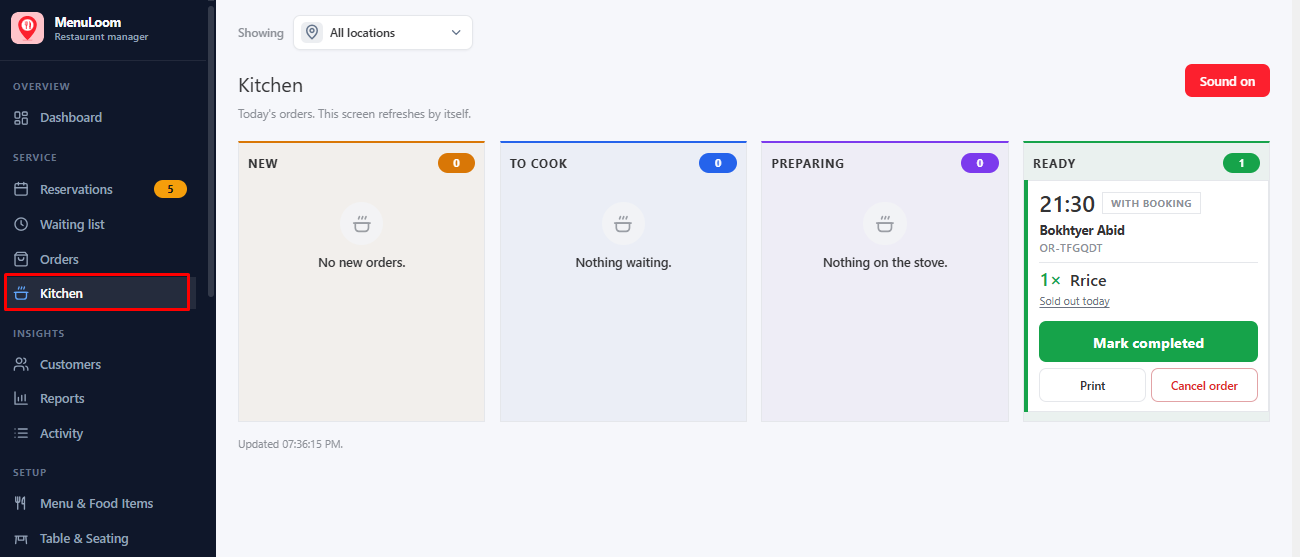
| Column | Orders in it |
|---|---|
| New | Pending orders that need confirming. |
| To cook | Confirmed orders waiting to be started. |
| Preparing | Orders being cooked now. |
| Ready | Orders ready to hand over. |
Move an order forward with the buttons on its card. The screen refreshes itself every few seconds, so you can leave it open on a tablet in the kitchen.
Several cooking stations?
With Pro, Kitchen stations send each dish to the right station and print a ticket for it.
Was this article helpful?Thanks for your feedback.