Skip to content

AppointKit Learning

  • suite
  • single
  • book

docs

MenuLoom Docs
  • How to Install & System Requirements
  • Admin Dashboard Overview
  • Your First Setup, Step by Step
  • Pro Features Overview
  • Create a Menu
  • Add Categories
  • Add Food Items
  • Add-on Groups
  • Areas and Tables
  • Block Tables for a Private Event
  • Managing Reservations
  • Waiting List
  • Turn On Online Food Ordering
  • Managing Orders
  • The Kitchen Screen
  • General Settings
  • Opening Hours and Closed Dates
  • Booking Rules
  • Email Notifications
  • Customer Accounts
  • Appearance and Colors
  • How to Add MenuLoom to a Page
  • Booking Form Shortcode
  • Menu Shortcode
  • Food Grid Shortcode
  • Customer Account Page
  • Customers
  • Reports
  • Activity Log
  • Coupons and Discounts
  • Holiday and Special Events
  • Multiple Locations
  • Kitchen Stations
  • Delivery Drivers
  • Loyalty Points
  • Menu of the Day
  • Promotions
  • Online Payments
  • Guest Ban List and Reservation Rules
  • Booking Form Builder
  • Email Design
Docs/Customers & Reports/Activity Log

Activity Log

Last updated November 9, 2026 · 1 min read

Open MenuLoom → Activity to see what was changed and when. It helps when several people work in the admin and you need to know who did what.
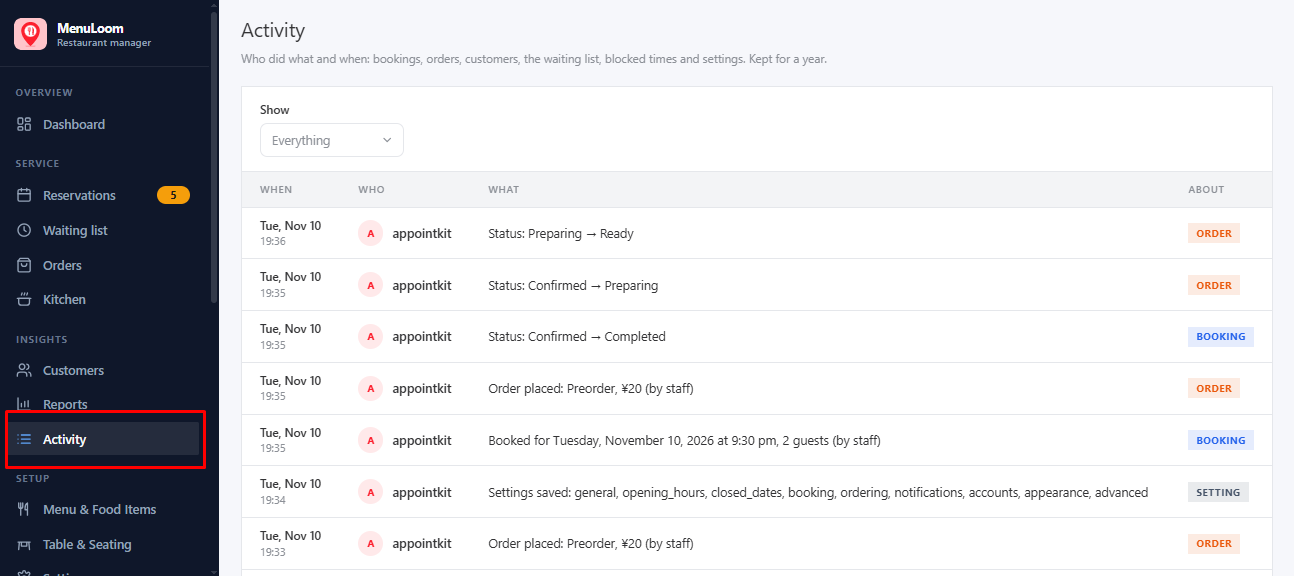
The Activity log
The Activity log

Each customer also has a History section showing what happened to that customer.

Was this article helpful?Thanks for your feedback.
← PreviousReportsNext →Coupons and Discounts

AppointKit Learning

  • Blog
  • About
  • FAQs
  • Authors
  • Events
  • Shop
  • Patterns
  • Themes

Twenty Twenty-Five

Designed with WordPress