Booking Rules
Go to Settings → Booking Rules.
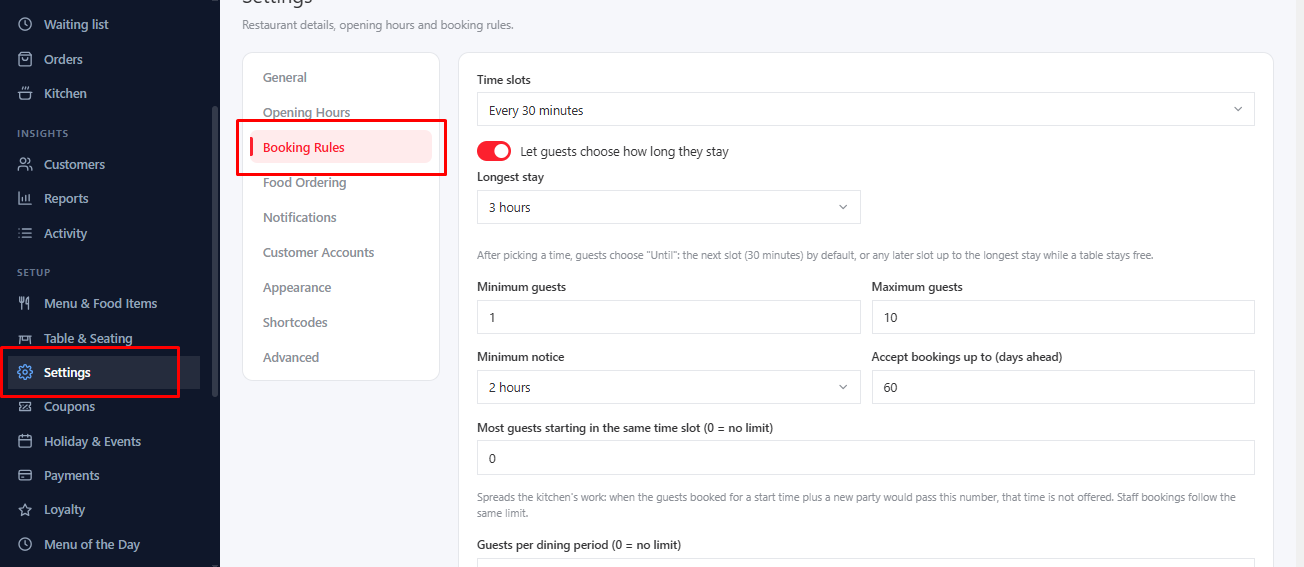
Who and When#
- Minimum guests / Maximum guests: the party sizes you accept.
- Accept bookings up to (days ahead): how far in advance guests may book.
- Minimum notice: the shortest time before a booking that you still accept.
- Time slots: how often start times are offered.
Dining Time#
- Dining duration (minutes): how long a table is held for a booking.
- Let guests choose how long they stay and Longest stay.
How Bookings Are Accepted#
- New bookings are: confirmed automatically, or left pending for you to confirm.
- Confirm parties up to (guests): small parties are confirmed automatically, bigger ones wait for you.
- Guests per dining period and Most guests starting in the same time slot: cap how busy you get. 0 means no limit.
- Late-arrival grace period (minutes): how long you hold a table before it can be released. 0 turns it off.
Extras#
- Pre-order food: let guests order food with their booking, and Guests can change their food until a number of hours before.
- Offer a waiting list when a day is full: see Waiting list.
Was this article helpful?Thanks for your feedback.